
Shopping List - Buy Me a Pie!
BUZZWORTHY VIBE COMPANY, LTD.Shopping
4.71.07K Reviews
- Version
- 3.5.37
- Installs
- 1.00M
- Age Rating
- Everyone
Screenshots

Our Review of Shopping List - Buy Me a Pie!
 Analysis by Appyee
I like to start a new shopping-list app with one modest goal: get a useful list ready before my next trip, without turning setup into another chore. Shopping List - Buy Me a Pie! is a grocery-shopping app from BUZZWORTHY VIBE COMPANY, LTD. Its central idea is straightforward: keep the things you need in a list on your phone, then use that list as you shop. That focus makes it a natural fit for routine grocery runs, though it is less suited to someone looking for a full meal-planning or price-comparison service.
Getting Started with Buy Me a Pie!
The first thing you'll notice about Shopping List - Buy Me a Pie! is its sleek and user-friendly interface. Setting it up is a walk in the park. Just download the app from the App Store or Google Play, and you’re all set to start organizing your shopping adventures.
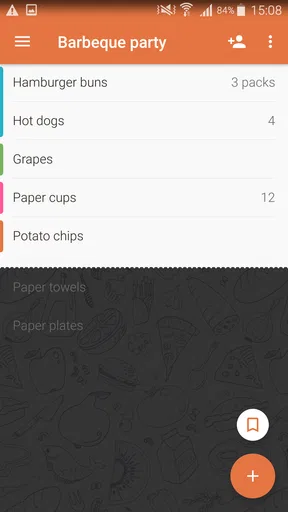
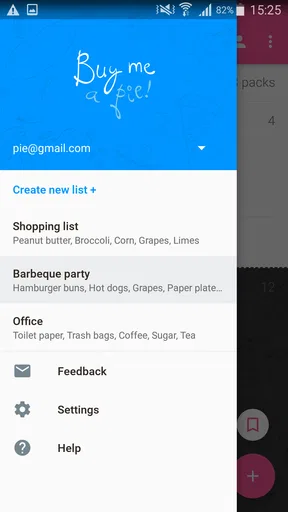
The app is designed with simplicity in mind, making it super easy for anyone to jump right in. You can create multiple lists for different stores or occasions, so whether you’re planning a big family dinner or just need a few essentials, Buy Me a Pie! has got you covered.
Making the First List Useful
For a first run, I’d keep things deliberately small. Add the handful of items you already know you need for the next grocery trip rather than trying to record every pantry staple at once. That gives you a quick chance to learn how adding, grouping, and checking off items feels in practice. Once the basic routine is comfortable, a separate list for a different shop or occasion can keep a large weekly grocery run from getting mixed up with one-off errands.
A practical detail is to add an item as soon as you notice it is running low, not only when you sit down to plan a trip. If you share the list with someone at home, both of you can contribute while the need is fresh. For example, one person might add breakfast supplies after using the last of them, while the other adds ingredients for dinner. The list then becomes a small household handoff rather than a memory test at the store.
The app is free to download, and it is rated for Everyone. It has a 4.7 average from around 34,000 ratings, with more than a million installs. Those figures suggest it has found an audience, but what matters more in daily use is whether its simple list-based approach matches your habits. Optional in-app purchases are available, with items priced from $0.99 to $24.99; I’d start with the free experience and decide whether anything extra is relevant to your routine before spending.
Features that Stand Out
One of the standout features of this app is the ability to share lists with friends and family. Imagine this: you’re stuck at work, but you need to get groceries before the weekend. No problem! Simply share your list with your partner or a roommate, and they can pick up the items for you. It’s all about teamwork, right?
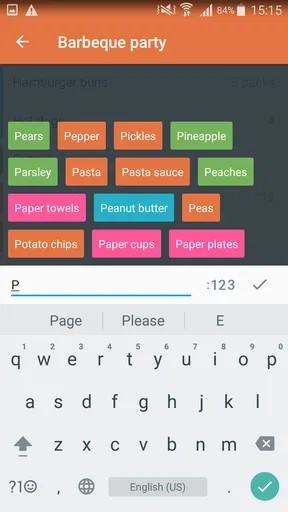
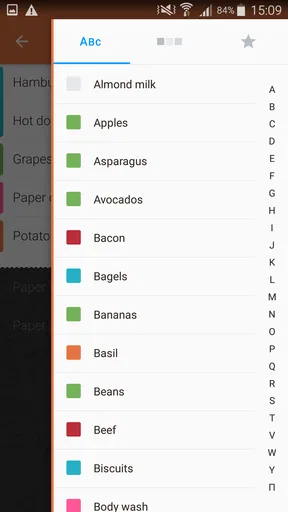
Another neat feature is the app’s smart suggestions. As you start typing an item, the app suggests commonly purchased items, saving you time. Plus, you can categorize items by color, making it easier to spot them while you’re shopping.
My useful tip here is to treat color as a visual cue, not as a substitute for a clear item name. A color grouping can help separate the parts of a shop you want to scan quickly, but vague entries still create uncertainty when you are standing in front of shelves. I’d write “plain yogurt” or “red onions,” for instance, rather than relying on memory to interpret a broad label. Suggestions are handy for repeat purchases, but I would still check the wording before adding an item if the exact kind matters.
The app also syncs seamlessly across devices. So, if you start your list on your phone and later switch to your tablet, all the information is right there. It’s like magic!
How It Makes Life Easier
I’ve personally found that using Buy Me a Pie! has made my shopping trips way more efficient. No more scribbling on paper or, worse, forgetting the list at home. Everything’s neatly stored on my phone, ready to go whenever I am.
Let’s not forget about the convenience of the app being offline-friendly. You can access and edit your lists even without an internet connection. So, if you find yourself in a store with spotty Wi-Fi, you’ll still be in good shape.
This offline access is especially reassuring if you make your list at home and then shop somewhere with an unreliable connection. I’d prepare the list before leaving, then avoid making connection-dependent assumptions while in the aisle: the practical win is that the list remains usable when service drops. When more than one person is contributing, it also helps to agree on who is doing the actual shop, so two people do not both buy the same item after working from separate expectations.
Choosing It Over Other Shopping Habits
Compared with a paper note, the main advantage is that the list stays on the phone you are likely to bring into the store, and you can update it instead of rewriting it. Compared with a general notes app, the suggestions, colored categories, and shared-list focus are more directly aimed at grocery shopping. That convenience has a trade-off: a plain note can feel faster for someone who wants only a few lines and dislikes setting up or maintaining an app.
It also is not a grocery delivery marketplace or a budgeting tool. If your priority is comparing store prices, placing an order, or building detailed meal plans, a specialized service will be a better match. Buy Me a Pie! makes more sense when your main problem is remembering what to pick up and coordinating the list with another person. Its value is in making that small task less scattered, not in managing every part of food shopping.
The Social Element
What I love most about this app is how it brings people together. Sharing lists with family members has made shopping a shared experience rather than a solo task. The collaboration aspect is fantastic, especially for busy households. Everyone can chip in, and before you know it, the list is complete.
Plus, with notifications, you can get updates when someone adds or removes an item. It’s like having a real-time conversation about what’s needed, without having to send a single text.
For a household, I’d use one shared list for regular groceries and keep special-event shopping separate. That makes it easier for the person heading to the store to see what belongs to the everyday run instead of sorting through a list crowded with ingredients for a future occasion. A brief note between people can still be useful when an item needs a particular brand or size; sharing reduces back-and-forth, but it does not automatically remove the need to be specific about preferences.
Where It Fits—and Where It Doesn’t
I think this app is best for people who shop for the same household regularly, split errands with a partner or roommate, or often remember missing ingredients only after they have left home. It can also help someone who shops for more than one occasion by keeping those needs in distinct lists. The colored grouping and suggestions reward repeated use: familiar items become easier to enter, and a list can be more readable than a hurried note written on the way out.
I would skip it if you rarely buy groceries, strongly prefer paper, or want one app to handle recipes, nutrition, inventory, delivery, and spending. A shared list is only helpful if the people using it agree to keep it current; otherwise, an outdated entry can be just as confusing as no list at all. For a very short, one-time errand, a basic note may be quicker. This is a focused shopping companion, and its usefulness depends on whether you want a dedicated place for this recurring task.
Common Questions Before You Rely on It
Do you need a connection while shopping? The app supports accessing and editing lists offline, so a weak signal need not stop you from using the list in the store. If you are sharing a list across devices, I’d make sure the people involved understand the routine before relying on last-minute changes: offline editing is useful, but it is sensible to check that shared updates have had a chance to sync when a connection is available.
Can it help with repeat purchases? Suggestions appear as you type, which can speed up adding familiar grocery items. I’d still review each entry for the right variety or quantity, especially for ingredients where a small difference matters. Does sharing make it useful for couples or families? Yes, when everyone adds needs consistently and the person shopping checks the current list. If nobody maintains it, the shared setup cannot solve that habit on its own.
Is it free to try? The app is free to download, with in-app purchases available. The version is 3.5.37, and it requires iOS 7.0 or later. It was released on August 20, 2013, and has about 1,100 written reviews. I’d treat those details as context, not as a reason to buy anything: first see whether the core list routine fits your household, then consider optional purchases only if they serve a clear need.
Final Thoughts
All in all, Shopping List - Buy Me a Pie! has transformed the way I approach grocery shopping. It’s intuitive, efficient, and turns what used to be a chore into something almost enjoyable. The app’s design and features are tailored to make life easier, and it doesn’t disappoint.
If you’re looking for an app that simplifies your shopping routine and helps you stay organized, give Buy Me a Pie! a shot. It might just become your new shopping sidekick, as it has for me. Happy shopping!
Verdict
Strengths of Shopping List - Buy Me a Pie!
- User-friendly interface with intuitive design.
- Syncs lists across multiple devices seamlessly.
- Supports multiple languages for wider reach.
- Includes price tracking for budgeting.
- Customizable categories for organized shopping.
Limitations of Shopping List - Buy Me a Pie!
- Limited offline functionality may hinder use.
- Ads can be intrusive without premium upgrade.
- Lacks integration with other shopping apps.
- Occasional sync delays reported by users.
- No barcode scanner for quick item entry.
Similar Picks in This Category
View All
SHEIN-Shopping Online
Roadget Business PTE. LTD.4.8

Amazon Shopping
Amazon Mobile LLC4.4


Mercado Libre: Compras online
Mercado Libre4.8

Wish: Shop and Save
Wish US Holdings LLC4.7

Alibaba.com - B2B marketplace
Alibaba Mobile4.4
Frequently Asked Questions
What features does Shopping List - Buy Me a Pie! offer?
Shopping List - Buy Me a Pie! offers a variety of features designed to streamline your grocery shopping experience. Users can create multiple shopping lists, share them with family or housemates, and categorize items by aisle. The app also supports synchronization across devices, ensuring your list is always up-to-date.
Is Shopping List - Buy Me a Pie! available on both Android and iOS?
Yes, Shopping List - Buy Me a Pie! is available on both Android and iOS platforms. This cross-platform availability allows users to download the app from either the Google Play Store or the Apple App Store, making it accessible to a wide audience regardless of their device preference.
Does the app require an internet connection to function?
Shopping List - Buy Me a Pie! can function both online and offline. While an internet connection is required for synchronizing lists across devices and sharing them with others, users can still add and organize items without internet access, making it convenient for shopping in areas with limited connectivity.
Is there a cost associated with using Shopping List - Buy Me a Pie!?
Shopping List - Buy Me a Pie! offers both free and premium versions. The free version includes basic features, while the premium version provides additional functionalities such as ad removal and advanced list organization options. Users can choose a plan that suits their needs and budget.
How user-friendly is Shopping List - Buy Me a Pie!?
Shopping List - Buy Me a Pie! is designed with user-friendliness in mind. The app features an intuitive interface that makes it easy to add, remove, and categorize items. With its simple navigation and clear layout, even first-time users can efficiently manage their shopping lists with minimal effort.
